

Enterprise workflow automation sounds technical, but in practice it’s pretty simple: it’s what happens when a business stops relying on people to “remember the next step.” Instead, the system moves work forward based on rules, triggers, and real-time data across tools like ERP, CRM, HR platforms, and ticketing systems.
In most companies, this starts as a cleanup exercise. Someone is tired of chasing approvals in email threads or manually updating three systems just to close a single task. Automation enters as a fix but quickly turns into something bigger: a quiet redesign of how work flows across the organization.
What often gets missed is that automation doesn’t just speed things up. It exposes how messy the underlying process already was.
What Enterprise Workflow Automation Is in Real Businesses
In theory, Enterprise workflow automation is about connecting systems. In reality, it’s about removing human “hand-offs” that don’t add value.
Take a simple example: a deal marked “won” in a CRM. That single event can trigger billing in ERP, onboarding tasks in HR, provisioning in IT, and even notifications in finance. No one is manually coordinating that anymore. Or at least, they shouldn’t be.
But here’s the part people underestimate—most enterprises don’t have clean workflows to begin with. They have habits. Workarounds. Spreadsheets no one officially owns but everyone depends on.
So automation doesn’t start with tools. It starts with untangling what people actually do, not what the process document says they do.
Key Processes Suitable for Automation
Not everything should be automated, even if it technically can be.
The best candidates are processes where decisions are boring, repeatable, and predictable. Invoice validation is a good example. IT password resets. Employee onboarding steps. Things where humans are mostly acting as routers, not decision-makers.
But there’s a trap here. Teams often try to automate processes that are still evolving. That usually backfires. You end up encoding instability into software and then wondering why the system keeps breaking.
A more reliable signal is this: if a process can be explained in one consistent way across three different employees, it’s probably ready.
If not, automation just freezes confusion in place.
Assessing Workflow Readiness
This is the step most teams rush, and it shows later.
A process might look “documented,” but that doesn’t mean it’s real. The actual version often lives in people’s heads or inside Slack messages that never make it into formal systems.
Another issue is variability. If the outcome changes depending on who handles it, or if approvals depend on “experience,” you don’t have a workflow—you have judgment masquerading as a process.
Data quality is another quiet failure point. Automation assumes structured inputs, but enterprises often run on messy fields, inconsistent naming, and incomplete records. If that isn’t fixed first, automation just scales the mess faster.
Mapping Processes for Automation
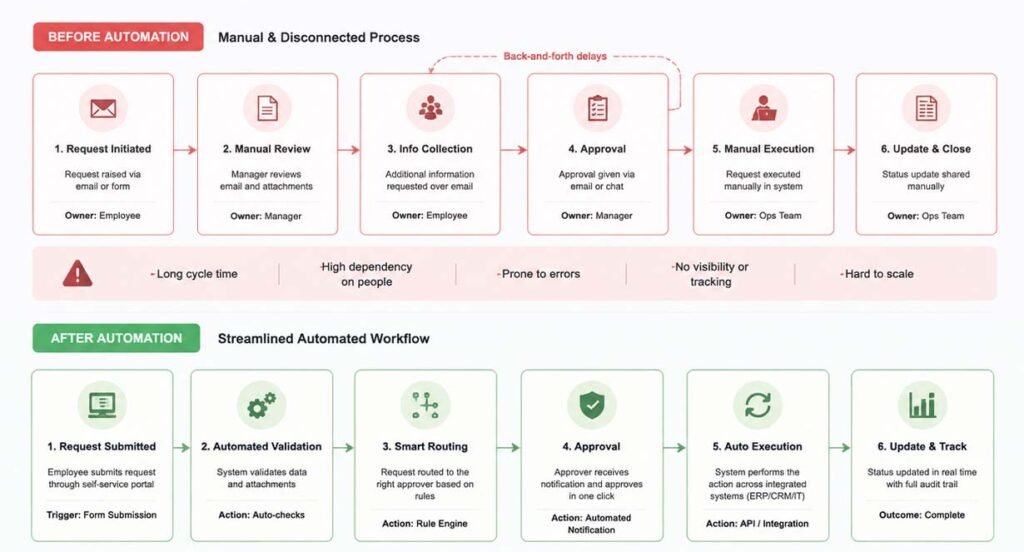
The mistake is drawing how things should work. The better approach is to watch how things actually move today—even when that means taking shortcuts and unofficial steps.
You’ll usually find shadow processes here. Work happening in Excel files. Approval messages buried in email threads. Someone manually copying data because “the system doesn’t talk to the other system.”
Those shadow layers matter more than the official diagram.
The goal isn’t to produce a perfect flowchart. It’s to identify decision points: where does work actually change direction, and why?
Also Read: Top Node.js Development Companies
Choosing Automation Tools and Platforms
Platforms like Microsoft Power Automate fit well in Microsoft-heavy organizations because integration is already half-solved. On the other hand, tools like UiPath come into play when you’re dealing with older systems that don’t expose clean APIs.
The mistake I see often: teams pick tools first, then try to force workflows into them. That rarely ends well.
A better question is uncomfortable but useful: who will maintain this workflow six months from now? If the answer is “only engineering,” you may have already overbuilt it.
Designing Scalable Workflow Architecture
This is where systems either hold up or slowly turn into spaghetti.
A scalable workflow setup separates three things: when something starts, how decisions are made, and how actions are executed. Mixing these creates brittle systems that are hard to debug and even harder to evolve.
Another issue is uncontrolled growth. Teams start with one automation, then add another, and soon there’s a web of dependencies no one fully understands.
At that point, even small changes become risky.
The most stable setups treat workflows like infrastructure, not scripts. Versioning, documentation, isolation these aren’t “nice-to-have” things once you reach enterprise scale. They become survival requirements.
Integrating ERP, CRM, and APIs
Most enterprises already have systems of record—ERP, CRM, HRIS—but those systems don’t naturally coordinate with each other. Enterprise workflow automation has to sit on top and connect the dots.
A common problem quickly emerges: data mismatch. One system says “Acme Corp,” another says “ACME Corporation,” and suddenly automation creates duplicates or fails silently.
These aren’t edge cases. They are normal enterprise data problems.
The real breakthrough usually comes from standardizing identifiers and defining a shared data model early. It’s not exciting work, but it prevents a lot of broken workflows later.
Managing Approvals and Exceptions
Most organizations don’t eliminate approvals—they restructure them. Low-risk actions get automated. Higher-risk ones get routed. Edge cases get escalated.
The key is not trying to remove human input entirely. It’s deciding where human judgment actually adds value.
If everything requires approval, automation becomes pointless. If nothing allows exceptions, the system eventually breaks in unpredictable ways.
Threshold-based routing works well in practice. For example, small transactions move automatically, while larger ones trigger review. Simple idea, but surprisingly effective when implemented consistently.
Testing, Deployment, and Change Management
This is the stage where many “successful” automation projects quietly fail.
The workflow works in testing but breaks in the real world because real data is never as clean or predictable as test cases.
Good testing includes messy scenarios: missing fields, partial approvals, delayed responses. If you don’t simulate those, production will simulate them for you.
Change management is just as important. People don’t resist automation because they dislike efficiency. They resist it because it changes routines they didn’t even realize they were relying on.
If you ignore that layer, adoption suffers even when the system is technically correct.
Monitoring and Continuous Optimization
Once workflows are live, they stop being projects and become systems.
Cycle time becomes the most honest metric. If work slows down, something in the workflow is getting in the way even if it’s not obvious at first.
Another signal worth watching is manual overrides. If people keep stepping outside automation, it usually means the workflow no longer matches reality.
The healthiest enterprises don’t treat automation as “done.” They adjust it continuously. Not dramatically, just small refinements removing steps that no longer matter, tightening rules, fixing edge cases that show up in production.
Over time, that’s what actually creates maturity in automation systems.
Read More Tech Articles on: Zingyzon.com
FAQs
What is enterprise workflow automation in simple terms?
It’s a way to automatically move business tasks between systems and teams using rules rather than manual coordination.
Which processes are best for automation?
Stable, repeatable processes with clear rules, such as invoicing, onboarding or IT requests, work best.
Why do workflow automation projects fail?
Usually because the underlying process wasn’t clearly defined before automation started.
Do enterprises need coding for workflow automation?
Not always. Low-code tools handle many cases, but complex systems often still need engineering involvement.
