

Choosing the right Spa Booking Software can make daily work easier for owners, staff, and clients. A strong system should do more than place names on a calendar. It should help manage bookings, payments, staff schedules, customer records, reminders, memberships, and reports. The best choice will save time, reduce mistakes, and give clients a smooth booking experience from the first click to the final payment.
What the System Should Help You Manage
Staff members may offer different services, rooms may have limited space, and some treatments need special tools. Good software should bring all these details into one clear system. It should show who is free, which room is open, how long a service takes, and whether the client has paid.
The system should also support the full client journey. This includes online booking, confirmation messages, intake forms, check-in, payment, treatment notes, and follow-up messages. When these tasks work together, the spa can reduce manual work and give clients a more professional experience.
24/7 Online Booking and Mobile Scheduling Features
Clients often want to book outside normal business hours. A 24/7 booking page lets them choose a service, therapist, date, and time without calling the spa. It should also show real-time availability to prevent double bookings.
Strong Spa Booking Software should allow clients to reschedule or cancel within the rules set by the business. It should also support booking links on the spa website, Google profile, social media pages, and email campaigns.
Staff, Treatment Room, and Equipment Scheduling
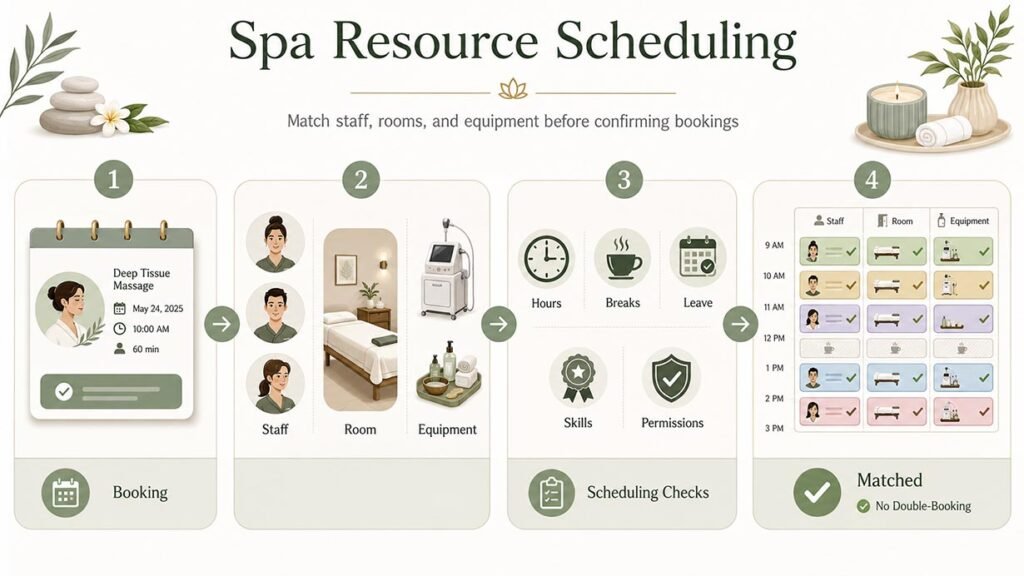
A spa appointment may need more than one free employee. It may also need a treatment room, massage table, facial machine, or other equipment. The software should check all required resources before confirming the booking.
Staff scheduling tools should show work hours, breaks, leave, skills, and service permissions. For example, a massage therapist should only appear for massage services they are trained to provide.
This feature becomes very important for busy spas. Without resource scheduling, the business may book two treatments that need the same room or machine at the same time.
Automated Appointment Reminders and No-Show Protection
Missed appointments can lead to lost income, especially for long or high-value treatments. Automated reminders can reduce this problem by sending clear messages before the visit.
These messages may include the date, time, service, therapist, location, and cancellation policy. The software should support email and text reminders at different times, such as 24 hours or two hours before the appointment.
It should also record late cancellations and no-shows. Some systems can collect deposits or safely store a card. This gives the business better protection when a client does not attend.
Secure Payments, Deposits, Refunds, and Cancellation Fees
A spa may want to collect a fixed deposit, a percentage of the price, or the full amount during booking. The system should clearly show the total cost, deposit paid, remaining balance, taxes, discounts, and tips.
Good Spa Booking Software should connect each payment to the correct appointment and client profile. It should also support refunds, split payments, gift cards, membership credits, and contactless checkout.
Deposit rules should be easy to change. For example, a spa may ask for a larger deposit for group bookings, long treatments, or expensive service packages.
The cancellation policy should also be visible before the client confirms the appointment. Clear rules can prevent confusion and make late-cancellation fees easier to manage.
Client Profiles, Intake Forms, and Treatment History
A detailed client profile helps staff provide a more personal and safer service. It may include contact details, booking history, preferred therapist, allergies, skin concerns, treatment notes, product purchases, and membership status.
Digital intake forms can save time at reception. Clients may complete health questions, consent forms, allergy details, and treatment goals before they arrive.
The system should store these records securely and limit access based on staff roles. A therapist may need access to treatment notes, while another employee may only need to view appointment details.
Medical spas should also check whether the platform meets the privacy and health-data rules that apply in their country or region.
Memberships, Packages, Gift Cards, and Loyalty Tools
Memberships and packages can create repeat visits and regular income. The software should track monthly benefits, unused credits, renewal dates, pauses, failed payments, and member discounts.
Package tools should show how many sessions a client has bought, used, and still has available. This prevents staff from checking balances by hand.
A useful Spa Booking Software platform should also manage digital gift cards and loyalty rewards. Clients should be able to buy gift cards online, send them to another person, and use the balance during booking or checkout.
Loyalty points and referral rewards can encourage clients to return and recommend the spa to others. The system should automatically add or remove points after each approved action.
Point-of-Sale, Inventory, and Product Management
Many spas sell skincare and wellness products at reception. An integrated point-of-sale system, also called POS, should let staff sell services, products, packages, memberships, and gift cards in one checkout.
It should support different payment methods and record sales under the correct employee when commission is used. This makes staff performance and payroll reports more accurate.
Inventory tools should update stock after each sale. They should also show low-stock alerts, supplier details, product costs, selling prices, and stock levels by location.
Advanced systems may also track products used during treatments. This can help owners calculate the real cost and profit of each service.
Marketing Automation, Reviews, and Client Retention Features
Marketing tools can help a spa stay connected with clients after their visit. The system may send birthday offers, rebooking reminders, review requests, aftercare messages, and special promotions.
These messages should be based on client permission and should be easy to stop if the client chooses.
The best Spa Booking Software can group clients by service history, spending, last visit, or membership status. This allows the spa to send useful offers instead of sending the same message to everyone.
For example, a facial promotion can go to clients who booked skincare treatments in the past. A massage reminder can go to clients who have not returned for several months.
Good marketing tools should also measure results. Owners should be able to see how many people opened a message, clicked a booking link, or made an appointment.
Reporting, Integrations, Security, and Software Pricing
Reports should help owners understand revenue, bookings, cancellations, staff performance, client retention, product sales, and membership income.
Useful integrations may include accounting tools, online calendars, email platforms, payroll systems, payment providers, and website builders.
Security is also important because spa systems may hold personal details, payment records, health information, and treatment notes.
Look for secure logins, staff permissions, two-step verification, backups, data exports, and payment protection. The provider should also explain who owns the business data and how it can be downloaded.
Pricing should be clear. Compare the full cost, including setup, text messages, payment fees, extra users, premium support, hardware, and additional locations.
A low monthly price may look attractive, but important features may only be available on a higher plan. The right platform should fit today’s needs while giving the business room to grow.
FAQs
What is spa booking software?
It is a digital system that helps spas manage online bookings, staff schedules, payments, client records, reminders, and daily business tasks.
Can clients book appointments at any time?
Yes. Most modern systems allow 24/7 online booking through a website, mobile page, social media link, or Google business listing.
Does spa software help reduce no-shows?
Yes. Automated reminders, deposits, stored cards, and clear cancellation rules can lower the number of missed appointments.
Can the software manage rooms and equipment?
Advanced systems can match each service with the correct employee, treatment room, bed, machine, or other required resource.
How should I choose the right platform?
List your must-have features, test the booking process, compare total costs, check support quality, and choose a system that can grow with your spa.
