

Most startups spend money on software that they use only in parts.
It was a discovery I made while working with online businesses and startups for months, using various SaaS tools and SEO workflows. There were some tools that actually made things more efficient and easier to do. Some looked good at the initial hire but soon proved to be costly time wasters.
After all, I’m not here to promote products by going on product pages and listing all their features – I am here to tell you which SaaS products are actually being used by real startup founders in 2026.
I worked on the following tools:
- genuinely useful
- easy to adopt
- scalable
- It is the most affordable and feasible of the startup budgets.
I had to think about these tools for my startup if I had to create a startup from scratch today—these are the ones I would look into again for sure.
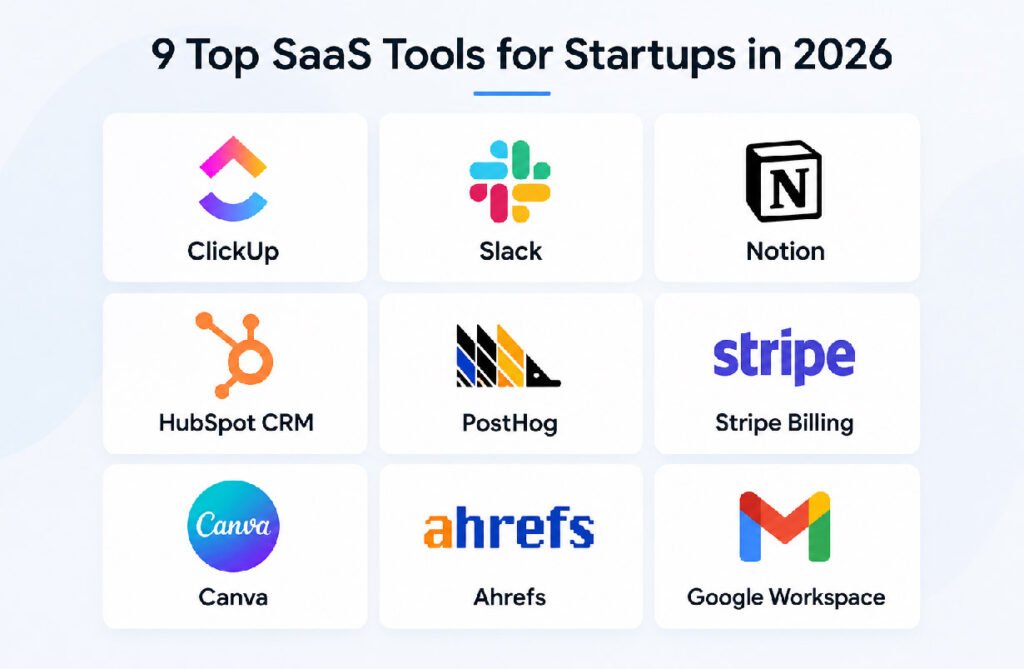
Quick Comparison: Top SaaS Tools for Startups
| Tool | Best For | Free Plan | Starting Price |
|---|---|---|---|
| ClickUp | Project management | Yes | $7/user/month |
| Slack | Team communication | Yes | $7.25/user/month |
| Notion | Documentation & planning | Yes | $9.50/user/month |
| HubSpot CRM | Customer management | Yes | $20/month |
| PostHog | Product analytics | Yes | Usage-based |
| Stripe Billing | SaaS billing | No | 0.7% billing volume |
| Canva | Startup design | Yes | $12.99/month |
| Ahrefs | SEO & content growth | No | $129/month |
| Google Workspace | Productivity & email | No | $7/user/month |
How I Tested These SaaS Tools
I did not run these platforms in stand-alone demos.
I’ve used them in real-world start-up processes, including project management, content management, analytics tracking, onboarding systems, SEO campaigns, and team collaboration. I also tested the performance of non-technical teams when it came to adapting to each platform, as that’s something most founders don’t consider.
The early lesson learned is that the best startup software is likely to streamline business operations rather than complicate them.
This is crucial, as startups have turned to SaaS tools for quite some time now. The number of tools used is generally reported as 25–30 for seed-stage startups and 50+ for larger startups. Poor software choices can quickly cost you a fortune.
1. ClickUp — Best All-in-One Project Management Tool
I was using ClickUp as an alternative to Trello, but it has since evolved into a lot more than that. In a matter of weeks, it replaced several workflow tools because it allows tasks, documentation, dashboards, and automation all within a single workspace.
ClickUp’s top feature is its flexibility. Simple Kanban boards can serve as a starting point, and more advanced systems can be built incrementally over time.
I enjoyed the least amount of context switching the most. Most operational tasks were not spread across multiple apps. Then the project management process seemed cleaner.
The downside is that ClickUp can get overwhelming if you enable too many features, too quickly. Simple setups are often the best for small startups.
Best for
Enterprises looking to have a single platform for tasks, operations, and workflow management.
Pricing
Free plan available. Paid plans start around $7/user/month.
2. Slack — Still the Best Startup Communication Tool
I tried newer communication apps like Discord and Microsoft Teams, but Slack remained the most useful option for startup teams.
The primary reason is the integration into the ecosystem. Slack seamlessly integrates with various tools, including Notion, Google Drive, ClickUp, GitHub, and HubSpot, providing a sense of communication that is not fragmented.
Also, I observed that teams moved more quickly in Slack than in email-based workflows. Without the need to meet endlessly, channels organize conversations, making them searchable and easier to follow.
While the free version will suffice for many startup businesses, larger companies might begin to reach the message history cap at some point.
Best for
Teams at a distance, fast-growing startups.
Pricing
Free plan available. Pro begins at $7.25/user/month.
3. Notion — Best for Documentation and Internal Systems
During testing, I spent almost every day opening Notion.
As teams expand, information can become very confusing. Meeting minutes get lost in Google Docs, Slack, and even in random spreadsheets. All that is well-addressed in the surprisingly effective Notion, a place that coordinates documentation and planning.
I used it for:
- SOPs,
- content planning,
- onboarding,
- internal wikis,
- and roadmap organization.
The system’s interface is very flexible and not too technical, which makes it easier to adopt for smaller teams.
I once worked with a startup team that was able to drastically improve the confusion about onboarding by consolidating all of their internal documentation into Notion, instead of having them stored in a myriad of documents and Slack threads.
In 2026, AI features have seen significant enhancements, particularly in summarizing notes and organizing information quickly.
Best for
Documentation, planning and start-up operations.
Pricing
Free plan available. The paid plans begin at approximately $9.50/user/month.
4. HubSpot CRM — Best Free CRM for Startups
I’ve tried a number of different CRM systems over the years, Salesforce and Zoho come to mind, but HubSpot remains the simplest recommendation for startups.
The primary one is that the free version really has something useful.
Some CRM solutions go too far in restricting features crucial to the success of startups, but not HubSpot.
What I also noticed is that HubSpot was much more user-friendly for a non-sales team than enterprise-style CRMs were. This is important because many early-stage startups don’t have a CRM specialist on board.
Another great benefit is scalability. Businesses can take advantage of the free CRM and then grow their operations to support marketing automation and sales tools without moving systems.
Best for
Lead management and customer relationships.
Pricing
Free CRM available. Starter plans start at approximately $20/month.
5. PostHog — The Most Underrated Analytics Tool I Tested
I’m pretty sure PostHog was the biggest surprise on this list.
Most small businesses set up Google Analytics and think they know how to use it. Actually, product-led startups typically require an in-depth understanding of onboarding processes, feature engagement, and user drop-off.
This is where PostHog proved to be a huge asset during testing.
Session recordings and funnel tracking enabled us to see where users get confused in onboarding systems in a much simpler way. In one SaaS workflow I tried, I saw people keep leaving the signup process, and PostHog helped me figure out where and how. In one SaaS workflow I ran, I saw a ton of users drop out of the signup funnel – because PostHog showed me where and how.
The free tier is also very generous compared to many analytics competitors.
Best for
Product analytics and SaaS startups.
Pricing
Free plan available. A price scale of paid, which increases at a certain rate with use.
6. Stripe Billing — Best Billing Platform for SaaS Startups
I don’t know if it’s a reflection of it being the only thing left to do, but I think it’s fair to say that stripe has become almost mandatory in these new SaaS companies, and I’m not complaining.
The subscription and recurring payment process, upgrades, and failed payment recovery are much more seamless using the billing system than many competing systems.
During testing, scalability stood out as a key element. While some payment platforms can be used effectively with basic transactions, they can become a nuisance when the payments become more complex. Stripe’s solutions proved effective for those processes without causing operational headaches.
The transaction-based pricing model also works well for startups seeking to steer clear of upfront costly software memberships.
Best for
Subscription billing and SaaS payments.
Pricing
Stripe Billing starts around 0.7% of billing volume.
7. Canva — Best Design Tool for Non-Designers
I used Canva for some quick work, but I found it wasn’t as powerful as I’d thought.
You don’t always have a startup founder who can design or for many businesses have a dedicated creative team early on. Canva restores this by enabling you to create visual content in a very short time.
I have used it for social graphics, blog visuals, presentations, lead magnets and startup branding. The templates are much improved from a few years ago and it is easier to produce good-looking assets in a matter of minutes.
The best thing is speed. Instead of hours spent in complex design software, startup teams can develop useful visuals in mere moments.
Best for
Marketing content and startup branding.
Pricing
Free plan available. The price of Canva Pro begins at approximately $12.99/month.
8. Ahrefs — Best SEO Tool for Startup Growth
If organic search is important for your startup, then SEO tools are not an option.
I tried a few lower-budget options and Semrush, but Ahrefs always had the best experience. The quality of the keyword research is very good, the backlink analysis seems trustworthy and the interface is more user-friendly than many enterprise SEO software products.
Personally, I have leveraged Ahrefs to find low-competition keywords and then use them to generate long-term traffic opportunities. After restructuring pages based on Ahref keywords, one content project gained significant visibility in search results.
There is one obvious drawback to pricing: If you’re a startup in early stages, and have not established a clear SEO strategy, it may cost you too early.
Best for
Content growth and SEO startups.
Pricing
Plans start around $129/month.
9. Google Workspace — Still Essential for Every Startup
Google Workspace might not be the most eye-catching on this list, but it’s one of the most essential.
Emails, cloud storage, calendars, documents, and collaboration are reliable and effective within a single ecosystem. That simplicity is more important than most founders realize.
In testing, startups that utilised the fragmented systems always had to deal with more operational hurdles. Google Workspace provides a unified approach to communication and collaboration, particularly for remote teams.
Many other collaborative editing tools are still outdone by Google Docs.
Sometimes, simple software is the best, as it just does what it does without causing problems.
Best for
Productivity and collaboration.
Pricing
Prices for Business Starter start at $7 a user per month.
Read More Technology Article on: Zingyzon.com
Which SaaS Tools Should Startups Actually Pay For?
Following the tests, I had spotted a pattern:
Founders’ stacks are typically much smaller than they think.
It’s easy to over-engineer the workflow and get excited about software that is not necessary until the startup is scaled up. In my personal opinion, the following steps would be the first steps you would take if you were building a startup now:
- Google Workspace
- Slack
- Notion
- ClickUp
- HubSpot CRM
- Stripe
Then, I would only add advanced tools such as Ahrefs or PostHog when growth demanded it.
The objective shouldn’t be about software subscriptions.
The desired outcome should be the elimination of blockages.
Final Verdict
I’ve evaluated many SaaS platforms and these are the ones that I feel offer the best value to startups in 2026.
Again, not all the tools on this list are essential for every start-up, but a leaner, greener software portfolio is likely to be more beneficial for most start-ups than chasing new software tools at every turn.
I personally would make my top three overall tools:
- Notion
- HubSpot CRM
- Google Workspace
They help answer basic operational issues that every start-up will eventually encounter.
Of all the tools tested, the most important thing I learned is that:
The ideal startup software is the one your team continues to use after the excitement dies down.
