

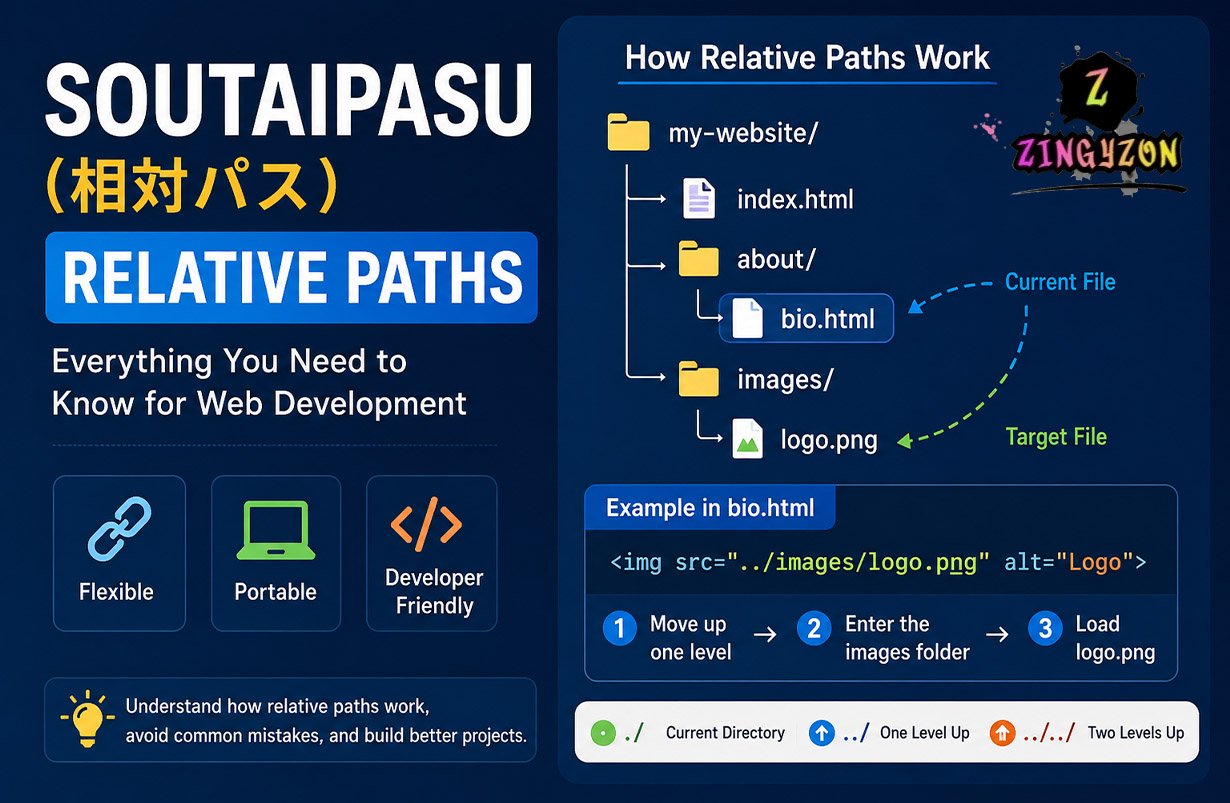
In computing and web development, Soutaipasu (相対パス) refers to a relative path — a method of locating files and folders based on the current directory rather than the root directory. Relative paths are one of the most important concepts in programming, especially in HTML, CSS, JavaScript, Linux systems, and modern frontend development.
If you have ever linked an image in HTML, imported a JavaScript file, or connected a stylesheet to a webpage, you have already used Soutaipasu.
This guide explains what Soutaipasu means, how relative paths work, why developers use them, and the most common mistakes beginners make.
What Does Soutaipasu Mean?
Soutaipasu is a romanized version of the Japanese phrase:
相対パス (Sōtai Pasu)
which literally translates to:
Relative Path
In programming, a relative path tells a computer or browser where to find a file relative to the current file’s location.
For example:
../images/logo.png
This tells the browser to:
- Move up one folder level
- Enter the images folder
- Load logo.png
Relative paths are commonly used because they are:
- flexible,
- portable,
- shorter,
- and easier to maintain than absolute paths.
Relative Paths vs Absolute Paths
To fully understand Soutaipasu, you first need to know the difference between relative and absolute paths.
| Feature | Relative Path | Absolute Path |
| Depends on current location | Yes | No |
| Portable | Yes | Usually no |
| Shorter syntax | Yes | No |
| Uses root directory | No | Yes |
Relative Path Example
../images/logo.png
Absolute Path Example
/Users/username/project/images/logo.png
Absolute paths always point to one exact location, while relative paths adapt based on the current file’s position.
How Relative Paths Work
Relative paths use shorthand symbols to move through directories and folders.
Understanding ./, ../, and ../../
| Symbol | Meaning |
| ./ | Current directory |
| ../ | Move up one folder |
| ../../ | Move up two folders |
Imagine this folder structure:
my-website/├── index.html├── about/│ └── bio.html└── images/ └── logo.png
If you are editing:
about/bio.html
and want to display:
images/logo.png
the correct relative path is:
../images/logo.png
The browser:
- exits the about folder,
- enters the images folder,
- loads logo.png.
Real-World Examples of Soutaipasu in Web Development
Relative paths appear almost everywhere in frontend development.
Using Relative Paths in HTML
<img src="../images/logo.png">
This loads an image relative to the current HTML file.
Using Relative Paths in CSS
background-image: url("../images/bg.jpg");
CSS files commonly use relative paths to load:
- images,
- fonts,
- icons,
- and media assets.
Using Relative Paths in JavaScript
import Header from "./components/Header.js";
Modern JavaScript frameworks like:
- React,
- Vue,
- Next.js,
- and Angular
rely heavily on relative imports.
Also Read: Is SteamUnlocked Safe to Use? A 2026 Guide to the Risks and Alternatives
Benefits of Using Relative Paths
Relative paths are preferred by developers for several important reasons.
1. Portability
If you move a project to:
- another computer,
- a live server,
- GitHub,
- or cloud hosting,
the links still work as long as the folder structure remains unchanged.
This is one of the biggest advantages of Soutaipasu.
2. Cleaner Code
Relative paths are much shorter than absolute paths.
Instead of writing:
/Users/john/Desktop/projects/my-site/assets/images/logo.png
you can simply write:
../images/logo.png
This makes code cleaner and easier to maintain.
3. Easier Team Collaboration
Different developers often work on different systems.
Example:
Alice:/Users/alice/projects/Bob:D:\Work\Projects\
Relative paths continue to work because they depend only on the project’s internal structure.
4. Better Local Testing
Relative paths allow websites to function offline before deployment.
Developers can test projects locally without requiring live server URLs.
Common Mistakes Beginners Make
Many beginners struggle with relative paths because folder navigation can become confusing.
Incorrect Folder Depth
Using:
images/logo.png
instead of:
../images/logo.png
may cause broken images because the browser searches in the wrong folder.
Using Too Many ../
Example:
../../../logo.png
Too many parent directory jumps can make projects difficult to maintain.
Broken File Structures
Renaming folders without updating paths often causes:
- missing assets,
- broken links,
- missing stylesheets,
- and JavaScript errors.
Best Practices for Using Soutaipasu
To avoid path-related issues, developers usually follow these best practices:
- Keep folder structures organized
- Use consistent naming conventions
- Avoid deeply nested directories
- Test all links after moving files
- Use browser developer tools for debugging
- Group assets logically (images, css, js, etc.)
A clean project structure makes relative path management much easier.
Mini Case Study: Building a Portfolio Website
Imagine a beginner developer creating a portfolio website.
Their folder structure looks like this:
portfolio/├── index.html├── css/│ └── style.css├── js/│ └── app.js└── images/ └── profile.jpg
Instead of using an absolute path like:
C:\Users\John\Desktop\portfolio\images\profile.jpg
they use:
../images/profile.jpg
When the project is uploaded to GitHub Pages or a live hosting server, all assets continue working correctly because the relative folder structure remains intact.
This is one of the biggest reasons relative paths are considered essential in modern web development.
Why Relative Paths Matter in Modern Development
Modern development environments rely heavily on:
- modular structures,
- reusable components,
- scalable architecture,
- and asset organization.
Frameworks like:
- React,
- Vue,
- Angular,
- and Next.js
all depend extensively on relative imports and file references.
According to the Stack Overflow Developer Survey, JavaScript continues to be one of the world’s most widely used programming languages, making file organization and relative path management critical skills for developers.
Relative Paths in Linux and Command Line Systems
Relative paths are not limited to websites.
Linux and Unix systems also use relative paths heavily.
Example:
cd ../documents
This command:
- moves up one folder,
- enters the documents directory.
Understanding relative navigation is essential for:
- Linux administration,
- backend development,
- DevOps,
- and server management.
SEO and Website Performance Benefits
Relative paths can also improve website management from an SEO and deployment perspective.
Benefits include:
- easier migration between domains,
- reduced hardcoded URLs,
- simpler staging-to-production deployment,
- cleaner internal linking structures.
While relative paths themselves do not directly improve rankings, they help maintain cleaner site architecture and reduce broken resource issues.
Conclusion
Soutaipasu, or relative pathing, is a foundational concept in programming and web development.
It allows developers to reference files based on their position within a project instead of relying on rigid system-wide addresses.
Understanding relative paths helps developers create:
- cleaner code,
- portable projects,
- scalable applications,
- and easier-to-maintain websites.
Whether you are building a small portfolio website or a large enterprise application, mastering Soutaipasu is an essential skill for modern development.
Frequently Asked Questions
What does Soutaipasu mean?
Soutaipasu is the Japanese term for a relative path used in computing and web development.
What is the difference between a relative path and an absolute path?
A relative path depends on the current file location, while an absolute path specifies the exact file location from the root directory.
Why do developers use relative paths?
Developers use relative paths because they make projects portable, cleaner, and easier to maintain.
What does ../ mean in a relative path?
It means “move up one folder level” to the parent directory.
Can relative paths break?
Yes. Incorrect folder structures or moved files can cause broken images, missing stylesheets, and invalid imports.
Do JavaScript frameworks use relative paths?
Yes. Frameworks like React, Vue, Angular, and Next.js heavily rely on relative imports and file referencing.
