


Claude Code is an AI coding assistant created by Anthropic. It helps developers understand projects, find problems, improve files, prepare tests, and manage everyday development tasks. The claude code documentation explains how to use the tool correctly, but some parts may feel technical for beginners. This guide explains the main features in simple B1 English, with practical advice that can help you work faster, avoid common mistakes, and stay in control of your project.
How to Install and Start Claude Code
Claude Code can be used in several places, including a computer terminal, Visual Studio Code, JetBrains tools, a desktop application, and a web browser. This gives developers the freedom to choose the working environment that feels most comfortable.
Before you start, make sure your computer and account meet the official requirements. After installation, open the folder that contains your project and begin a new Claude Code session. You can also continue an earlier session when you return to unfinished work. The claude code documentation recommends keeping each session focused on one main goal so Claude can understand the task clearly.
Write Clear Prompts with a Real Goal
Claude gives better answers when your request is clear and complete. A weak request such as “fix my project” does not explain what is wrong, where the problem appears, or what result you expect.
A stronger request should explain the problem, the area of the project, the expected result, and any limits. For example, you may say that users return to the login page after signing in and ask Claude to study the authentication system before making changes.
It is also helpful to explain how Claude should check its work. You can ask it to review the related files, test the final result, and report any remaining risks. Clear instructions reduce confusion and help Claude focus on the most important part of the task.
Ask Claude to Study Before Making Changes
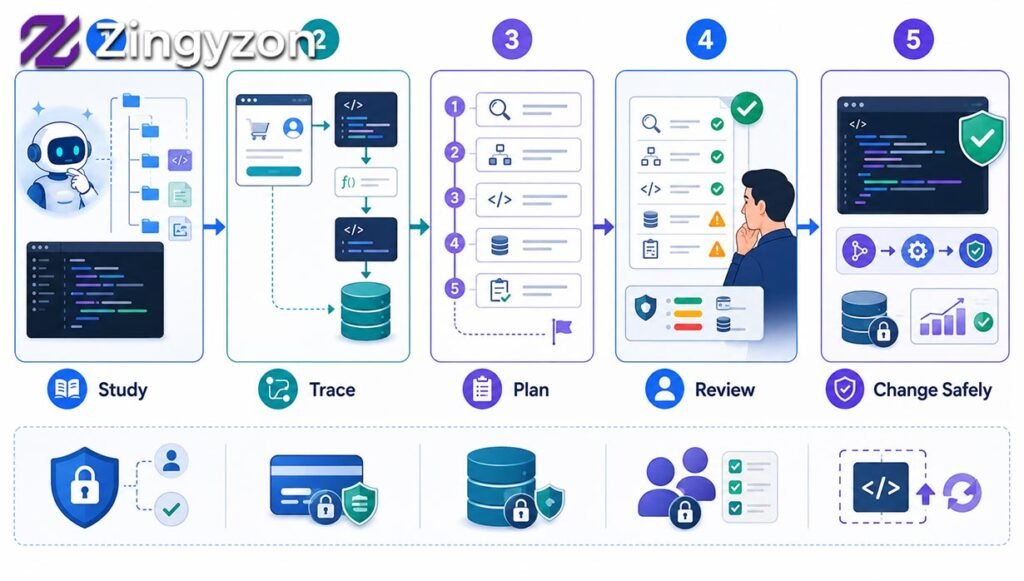
One of the safest habits is to ask Claude to study the project before changing anything. This gives it time to understand important files, project structure, data flow, and connections between different parts of the system.
For example, you can ask Claude to explain how a payment moves from the customer page to the database. You can also ask it to show which files and functions control that process.
After Claude studies the project, ask it to prepare a step-by-step plan. Review the plan before allowing changes. This approach is especially important for security systems, payments, databases, account permissions, and large project updates. It can prevent unnecessary edits and reduce the risk of breaking important features.
Use CLAUDE.md for Project Rules
A CLAUDE.md file stores important instructions that Claude should know while working on your project. According to the claude code documentation, this file can include project commands, coding rules, folder information, testing steps, and safety limits.
Keep the instructions short, clear, and practical. For example, explain where database work is located, which testing process the team uses, and which parts of the project Claude must not change without approval.
Avoid unclear rules such as “write better code.” Instead, use direct instructions such as “do not change the database structure without permission” or “add tests for all new business rules.”
This file is most useful when your team repeats the same instructions in many sessions. It helps Claude understand the project faster and reduces the need to explain basic rules again.
Check Every Change with Tests
Claude may create code that looks correct but still causes problems. For this reason, every important change should be checked carefully.
Ask Claude to run the related tests, review the project for errors, and confirm that the application still builds correctly. When Claude fixes a bug, ask for a regression test. This type of test proves that the old problem does not return later.
You should also ask Claude to explain which checks passed and which checks failed. Do not accept a simple statement saying that everything works. Request clear results.
Human review is still necessary. Changes related to payments, private information, user accounts, security, and production systems should always be checked by an experienced developer, even when all automatic tests pass.
Keep Changes Small and Easy to Review
Small changes are easier to understand, test, and correct. Large changes may include unrelated edits that make the final result difficult to review.
Tell Claude to make the smallest safe change needed for the task. Ask it to avoid renaming unrelated items, changing the style of full files, or updating project tools unless it is truly necessary.
Before starting a large task, save your current work. After Claude finishes, review every changed file. Ask why each file was changed and whether any edit can be removed.
The claude code documentation also explains that separate project workspaces can help when several tasks are being completed at the same time. This prevents different sessions from editing the same files and creating conflicts.
Use Skills, Subagents, and Hooks
Claude Code includes advanced features that can make repeated work easier. Skills are saved instructions for tasks that you perform often. You can create a skill for a release check, security review, testing process, or documentation routine.
Subagents are smaller AI helpers that focus on one special task. For example, one subagent may study database files while another checks project tests. This keeps the main conversation more organized.
Hooks allow automatic actions at certain points. A hook may check a command before Claude runs it, format a file after an edit, or send a message when a task is complete.
These tools can save time, but they should be used carefully. Review every skill, subagent rule, and hook before using it in an important project. Automatic actions can create problems when they have too much access.
Protect Permissions, Secrets, and Production Systems
Never approve a command or action without understanding it first. Be careful when Claude wants to delete files, install software, connect to outside services, change project history, or access production systems.
Ask Claude to explain an action in simple language before you approve it. When possible, choose a read-only action that allows Claude to study information without changing anything.
Private information also needs strong protection. Never place passwords, access tokens, private keys, or secret account details inside project instructions or conversations.
Tell Claude not to open private environment files unless they are truly needed. It should never display secret values or copy them into public files. Permissions and blocking rules can provide stronger protection than written instructions alone.
Manage Long Sessions and Project Context
Long conversations can become less accurate because too much information builds up. Start a new session when you begin a different task or move to another part of the project.
Use the project instruction file for lasting rules. Use skills for long procedures and subagents for separate research tasks. At the end of a session, ask Claude to create a short summary of completed work, changed files, test results, open problems, and recommended next steps.
The claude code documentation explains that project memory can help Claude remember useful patterns. However, memory should not be treated as a strong security system. Important restrictions should also be supported by permissions and automatic blocking rules.
Build a Safe Daily Claude Code Workflow
A strong daily workflow begins with research. Ask Claude to study the relevant part of the project and explain what it finds. Do not allow edits during this first step.
Next, ask for a clear plan that includes expected changes, affected files, testing steps, possible risks, and uncertain points. Review the plan and correct any wrong assumptions.
After approval, allow Claude to make a small and focused change. Then ask it to test the result, check for errors, and explain every changed file.
Finally, review the work yourself. Make sure no unrelated files were changed, no private data was exposed, and no important risks were ignored. Save useful lessons in your project instructions or create a reusable skill.
FAQs
What is Claude Code used for?
Claude Code helps developers understand projects, find bugs, improve files, create tests, and manage repeated development work.
Can beginners use Claude Code?
Yes. Beginners can use it, but they should give clear instructions, review every change, and avoid approving actions they do not understand.
What is a CLAUDE.md file?
It is a project instruction file that tells Claude about important rules, folders, testing steps, and safety limits.
Can Claude Code replace a developer?
No. It can support developers and save time, but people must still review important decisions, tests, security, and final changes.
Is Claude Code safe to use?
It can be used safely when permissions are limited, secrets are protected, commands are reviewed, and production access is carefully controlled.
