

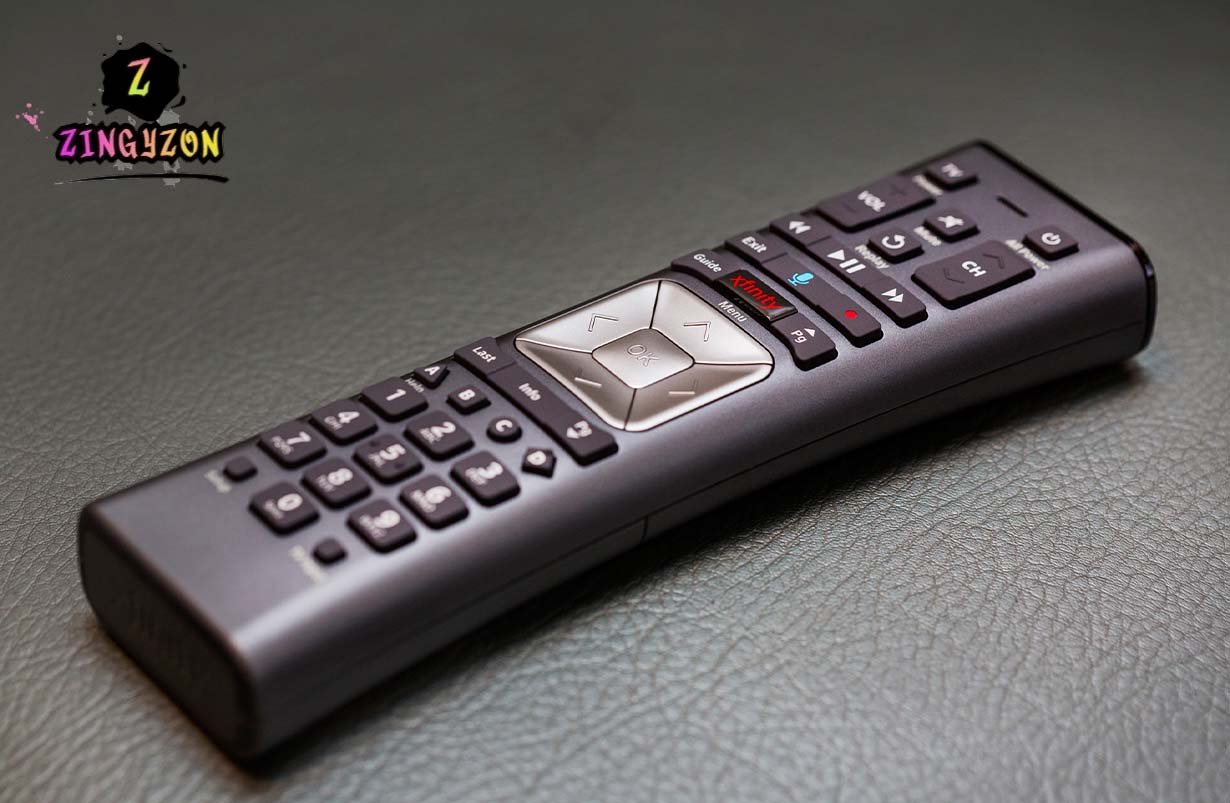
You’re not the only one who has picked up your Xfinity remote and looked at it like, “Oh, please, work.” It sounds like a no-brainer: just press some buttons, enter a code, and you’re done. But those who have actually tried know that there is a little more to it. In some cases, the remote turns the TV on, but the volume does not change. Sometimes it won’t even respond to any of the commands. Let’s face it, official guides are shallow.
The answer is this: Punching numbers isn’t the only way to connect and program your Xfinity remote. It’s all about learning how your “TV” communicates with your remote, understanding the peculiarities of modern television systems, and being willing to try something new. If you follow along with me, I will show you what actually works, what to avoid, and a few tips that aren’t mentioned in all blogs.
Why Some Remotes Just Don’t Work
Here’s something most guides never mention. Your Xfinity remote may technically be compatible with your TV, but hidden factors can cause it to misbehave. For instance:
- HDMI-CEC may bite you. Many modern TVs have HDMI-CEC enabled by default. It’s supposed to let devices communicate over HDMI so, say, your soundbar volume adjusts automatically. But sometimes your Xfinity remote ends up “confused,” sending commands that clash with the TV’s internal signals. Result? The TV turns on, but volume and input controls don’t.
- Code lists are outdated. Yes, Xfinity provides official codes, but they’re not always up to date for the newest models. A Samsung or LG code from 2020 might not work at all on a 2025 model. That’s why auto code search often beats manually entering a code—even though most people skip it.
- Timing matters more than you think. During auto search, your remote only locks in a code if you hit Setup at the right moment. Wait a second too long, and the remote forgets everything. It’s frustrating, but true.
So the first thing to realize is this: don’t blindly trust the instructions. Patience and observation matter more than you might think.
How to Connect Xfinity Remote to TV
Okay, let’s start with the connection itself. This is usually the “easy” part, but even here there are traps.
- Batteries first. Seriously. Weak batteries are the silent culprit behind many “remote won’t work” complaints. Always go with fresh alkalines don’t skimp.
- TV quirks matter. Some TVs have eco or quick start modes that interfere with infrared signals. Temporarily turning those off can save a lot of frustration.
- Enter setup mode properly. Hold Setup until the LED turns green. If your remote doesn’t have a Setup button, it’s Xfinity + Info instead. The key is holding long enough that the remote actually recognizes the command too short and nothing happens, too long and it may flicker unpredictably.
- Select TV. Press the TV button if available, or follow the prompts on your Xfinity box. Don’t skip this; otherwise, your remote won’t know whether you’re trying to control the TV or something else.
Here’s a little nuance most guides miss: just because the TV powers on doesn’t mean everything else works. Volume, mute, and input switching often need extra attention, especially on newer smart TVs that separate audio from video commands.
How to Program Xfinity Remote to TV
Now comes the part everyone argues about: auto vs manual. Spoiler: it’s not as simple as “one is better than the other.”
Auto Code Search
Auto search gets a bad rap, but hear me out. For many TVs released in the past couple of years, this method is actually more reliable than entering a code manually. Why? Codes can be outdated or incomplete for newer firmware.
- Press Setup, select auto search, and watch your TV carefully.
- When it turns off, immediately press Setup again to lock the code. Timing is everything here.
- Don’t panic if the TV flickers or volume jumps mid-search—this usually means the remote is communicating correctly.
A little tip: some people rush through this process and assume nothing is happening. Wait a few seconds between signals; sometimes the remote needs a moment to “settle” before locking in.
Manual Code Entry
Manual entry isn’t useless, but it’s trickier than most people realize.
- Start with the official Xfinity code for your brand.
- If it fails, check online for alternate codes for your exact model. Forums and user groups often have updated numbers that aren’t in the printed guide.
- Test volume and mute separately after entering the code. Power might work, but if other functions fail, you’ll need an alternative code.
One thing I notice from experience: people often skip this testing step. They assume if the TV powers on, everything else will too. That’s rarely the case.
Also Read: Windows 10 Display Issues
Beyond Power: Testing the Whole Remote
Once your remote seems to work, it’s tempting to just leave it at that. But if you want real usability, you need to test every function.
- Volume lag or jumpiness: If the volume doesn’t respond smoothly, try pressing buttons in short bursts instead of holding them down. Some remotes send commands too quickly for certain TVs.
- Input switching quirks: On some TVs, the Xfinity remote can only cycle through inputs rather than select a specific one. That’s not broken—it’s just how your TV handles IR signals.
- Smart TV menus: If your TV is a Samsung Tizen, LG webOS, or a similar platform, the remote might only support basic IR functions. Full menu navigation often still requires the TV’s native remote.
A little trial-and-error here goes a long way. Don’t assume everything will act exactly like the guides say.
An Overlooked Angle: Conflicts With Other Devices
Here’s a detail almost no one talks about. If you have multiple HDMI devices connected, your Xfinity remote might respond unpredictably.
- A soundbar using HDMI-ARC can interfere with volume commands.
- Game consoles like Xbox or PlayStation may occasionally respond to power-on signals if CEC is enabled.
Practical tip: disconnect other devices temporarily while programming your remote. Once it’s working, reconnect each device one by one to make sure everything still behaves correctly.
Resetting and Reprogramming: Not Just a Last Resort
Sometimes, even after following all the steps, your remote won’t behave. That’s when a full reset can save you hours of frustration.
- Hold Setup until the LED turns green.
- Enter 981 to reset.
- Start fresh with auto search.
Here’s the subtlety most guides miss: reset early rather than late. Repeatedly guessing codes without a clean slate usually wastes more time than a quick reset.
Why Patience Beats “Official” Instructions
This is the part that really matters: Xfinity remotes are not magic. Even if a guide says, “Enter this code and you’re done,” the reality is that each TV has quirks, firmware updates, and settings that affect how it responds. Treat programming your remote like a mini experiment:
- Test one function at a time.
- Take notes if something behaves oddly.
- Adjust based on what you see, not on what a guide says.
If you approach it with curiosity rather than frustration, it can actually be pretty satisfying when everything clicks.
In Short
Programming an Xfinity remote isn’t just about entering codes it’s about paying attention, experimenting, and understanding how your TV behaves. The official instructions get you partway there, but the real difference comes from noticing small quirks, testing functions beyond power, and being willing to reset and retry. Once you get the hang of it, your remote will feel like an extension of your TV, not a frustrating puzzle.
Read More Tech Articles on: Zingyzon.com
FAQs
My Xfinity remote powers on the TV but can’t adjust volume. Why?
Likely a code mismatch or HDMI-CEC conflict. Try auto code search and temporarily disable CEC on your TV.
Can one Xfinity remote control multiple TVs?
Yes, but each TV must be programmed separately. Conflicts can occur if multiple TVs are on at the same time.
The remote stopped working after programming—what should I do?
Check the batteries, turn off any power-saving modes on your TV, and consider a full reset using code 981.
Is auto code search better than manual entry?
For modern TVs, usually yes. Codes can be outdated, and auto search often finds a working sequence more reliably.
