

Software programs have numerous interrelated components. These components collaborate to provide functionality, data management, and user interactions.
As applications become larger and more complex, it becomes increasingly imperative to know how to classify software applications components. Correct classification facilitates code organization, clear responsibility and the construction of easier-to-scale and managed systems.
Regardless of your application’s size or scope, component classification can help you understand its structure and what each component does.
In today’s software design, components can be categorized in three ways:
- Identifies their function, or action (what they do).
- Architecture Layer (where they belong):
- What they do (How they operate)
A combination of all three provides a more comprehensive understanding of a software system.
What Are Software Application Components?
A software application component is an independent software program unit that carries out a particular duty in the larger application.
An eCommerce application could include separate components for user authentication, product management, payment processing, stock management and customer notification.
Each of these components operates on a specific function, but they are all interconnected. This separation facilitates easier application development, testing, and maintenance.
Perhaps a helpful analogy is a business. All departments play a role in the success of the business but each department has its own role. Software components function in the same manner.
Why Component Classification Matters
It is a common problem in software development projects that responsibilities become tangled, making the project hard to maintain.
Business rules are placed in user interfaces. There are many places in the codebase where database queries are used. There are multiple files with external integrations. This results in complexity and technical debt over time.
Component classification can resolve these issues by establishing clear responsibilities and delineating the boundaries.
The benefits include:
| Benefit | Impact |
| Better Maintainability | Easier updates and debugging |
| Improved Scalability | Components can grow independently |
| Faster Development | Teams can work on separate modules |
| Higher Reusability | Common functionality can be shared |
| Reduced Complexity | Clear architectural boundaries |
Clear responsibilities provide teams with efficient agility to build and maintain software.
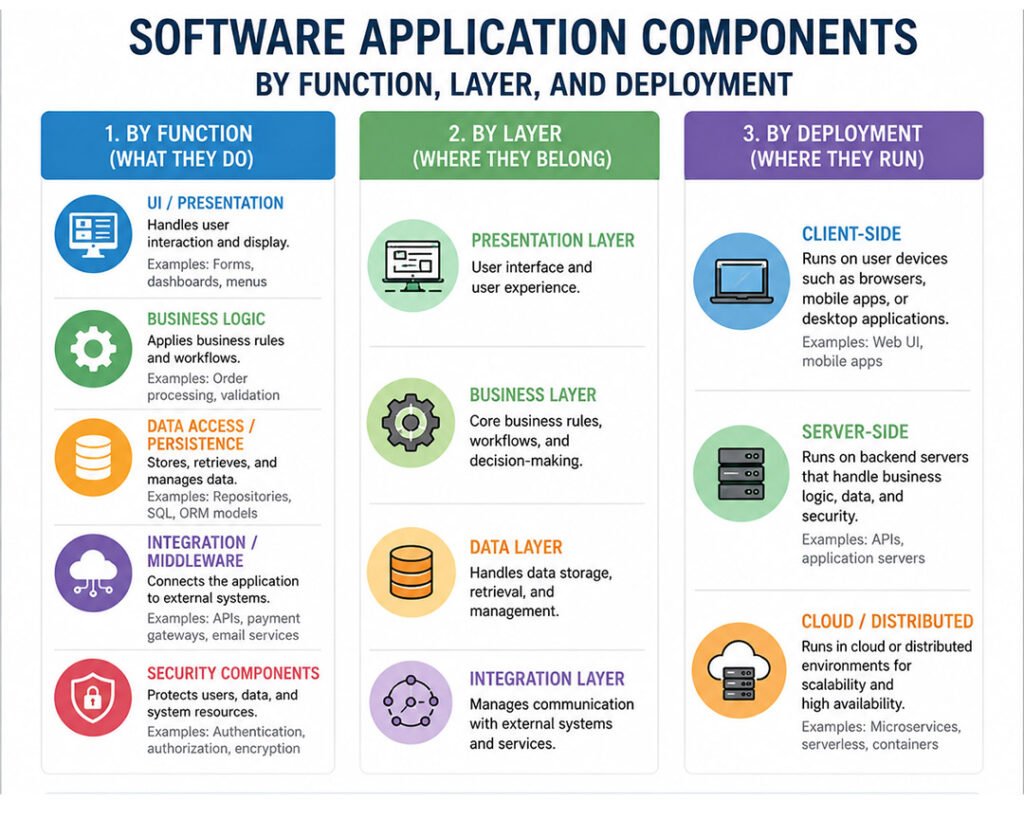
1. Function-Based Classification (by What They Do)
Function-based classification sorts components by the work they do.
This is usually the simplest method to understand an application, since it’s based on what each part of the application actually does.
The functional categories are listed in the table below as the most frequent.
| Component Type | Examples | Function |
| UI / Presentation | Forms, dashboards, navigation menus | Handles user interaction and display |
| Business Logic | Order processing, pricing engines, validation rules | Applies business rules and workflows |
| Data Access / Persistence | Repositories, SQL queries, ORM models | Stores, retrieves, and manages data |
| Integration / Middleware | Payment gateways, REST APIs, messaging systems | Connects applications to external services |
| Security Components | Authentication, authorization, encryption services | Protects users, data, and system resources |
Let’s dive right in and examine each in greater depth.
UI and Presentation Components
Presentation components make up the portion of the user’s view and interaction with the presentation.
These components provide information, gather input, and form the user experience of the app.
They can be found on web pages, mobile screens, forms, dashboards, navigation menus, and interactive controls.
A frequent architectural error is having business logic within presentation components. This may be convenient at first, but can lead to maintenance problems as applications grow.
The components of the presentation should therefore be mostly focused on user interaction and presentation.
Business Logic Components
Business logic components include the rules that dictate an application’s behavior.
They execute workflows, apply business policies and rules, and act in line with business needs.
Business logic components can compute taxes, check out discount codes, compute shipping costs and/or control inventory levels in an online store.
These components determine the application’s operation, so they are called the “heart” of the system.
Data Access and Persistence Components
Data access components deal with data communication with databases and storage devices. These are all elements that are engaged when information is saved, updated, retrieved, or deleted.
These can include repositories, database services, SQL queries, ORM models, data access layers, and many more.
It helps to separate persistence logic from business logic, simplifies application upkeep and enables future database changes.
Integration and Middleware Components
Most modern applications don’t work on their own. They regularly exchange data with external services such as payment gateways, email providers, cloud platforms, analytics tools, and CRM systems.
Integration components manage these connections. By centralizing communication with external APIs, middleware components reduce complexity and make the application easier to maintain as it grows.
Security Components
Security is considered a cross-cutting issue because it affects an application. Security components provide control over authentication, authorization, encryption, session management, and access control.
They include login systems, identity providers, OAuth services, and role-based access control modules.
Sensitive components typically control access to sensitive data and functionality; therefore, it is important to protect them.
Reusable Components
Special attention is due to reusable components.
The categories above are not the same as a functional classification, as reusable components are not functional. Rather, they are parts to be shared among various applications or services.
These include authentication systems, logging frameworks, monitoring, notification engines, and configuration management tools.
A reusable component can be used for any functional type, but can still be reused across projects.
Also Read: How Does Endbugflow Software Work?
2. Layer-Based Classification (Architectural Layers)
The layer based classification is based on the position of the component in the architecture. This way, the software is structured into different levels that define its respective responsibilities.
Presentation Layer
All user-visible functions are in the presentation layer. It is mainly used for the representation and input operations.
Presented layer capability is a capability that works in any browser, mobile device, or desktop environment, and serves as the layer between users and the rest of the system.
Business Layer
The Business Layer contains the core rules and workflows of the business application. Users submit requests, and the business layer decides what to do with them.
This layer will usually have the most application-specific logic.
Data Layer
The data layer is responsible for storing and retrieving information. It contains databases, repositories and data access services.
By storing data operations in this layer, the code is easier to maintain and future migrations will be simpler.
Integration Layer
The integration layer handles interactions with external systems. This can be anything from APIs, message queues, third party services, to enterprise middleware platforms.
This separation minimizes external dependencies with internal business logic.
3. Deployment-Based Classification
The focus of deployment based classification is on the location of the components running. This view is gaining relevance as cloud-native architectures evolve.
Client-Side Components
Client-side components are installed on the user’s equipment. These can be any type of application, such as a browser, mobile, or desktop app.
These components are used to interact with the user, display interfaces and execute simple processing operations.
When running part of the functionality on client devices, they become more responsive, and the load on the server side is reduced.
Server-Side Components
The server-side components are deployed to the backend infrastructure. They are responsible for business logic, database management, security policies, and application services.
Much of the critical application functionality runs on the server because it provides a secure, controlled environment.
Cloud and Distributed Components
Modern applications have a distributed architecture, using many servers and containers, and running in several cloud-based environments.
They can be microservices, serverless functions, distributed databases, cloud-native workloads, etc.
This way, it enhances scalability, resilience, and availability.
Why Multiple Classifications Matter
Most software components can be classified in more than one way.
For example, an authentication service is a security component from a functional perspective, part of the business layer from an architectural perspective, and typically a server-side component from a deployment perspective.
Viewing components through multiple perspectives provides a more complete understanding of the system and its architecture.
Real-World Example: E-Commerce application
In the example that follows, one application can be classified in more than one way.
| Component | Function | Layer | Deployment |
| Product Page | Presentation | Presentation Layer | Client-Side |
| Shopping Cart | Business Logic | Business Layer | Server-Side |
| Product Database | Persistence | Data Layer | Server-Side |
| Payment Gateway Adapter | Integration | Integration Layer | Server-Side |
| Authentication Service | Security | Business Layer | Server-Side |
| Recommendation Engine | Business Logic | Business Layer | Cloud-Based |
This multidimensional approach will enable the teams to better understand the system architecture.
Best Practices for Classifying Software Components
There are several basic principles important for effective classification.
First, think of high cohesion. Every component should have a single function.
Second, keep the coupling low. Components should clearly exchange data via interfaces while maintaining minimal coupling.
Third: Respect architectural boundaries. Don’t combine user interface code with business logic or database access.
Last but not least, record the role of each component. Documentation enhances teamwork and helps keep the codebase clean.
Conclusion
Understanding how to classify software applications components is essential for building maintainable and scalable software systems.
Function-based classification includes the purpose of a component. Layer-based classification is the classification of its role in the architecture. It’s deployed where.
These are all helpful ways to structure modern applications.
Development teams can create software that is simpler to comprehend, maintain, and evolve with time by following these principles and having clear component boundaries.
Read More Technology Article On: Zingyzon.com
FAQs
What are software application components?
Software application components are self-contained modules that perform specific responsibilities within a software system.
Why is software component classification important?
It improves maintainability, scalability, organization, and architectural clarity.
What is function-based classification?
Function-based classification categorizes components according to their responsibilities, such as presentation, business logic, persistence, integration, and security.
What is layer-based classification?
Layer-based classification organizes components into architectural layers such as presentation, business, data, and integration.
What is Deployment-based classification?
Deployment-based classification classifies components based on where they run, such as client-side, server-side or cloud-based.
Can a component belong to multiple classifications?
Yes. Most components can be categorized at multiple levels: function, architecture level, deployment location, and technology.
What is the difference between high cohesion and low coupling?
High cohesion: a component does one thing and is low on coupling: unimportant dependencies between components.
